Key takeaways
- Always design on the dieline for your exact board, not a template from the internet.
- Extend artwork 3 mm (1/8 inch) into the bleed and keep text 3-5 mm inside the safe zone.
- Send CMYK files with Pantone numbers for brand colours, images at 300 dpi and fonts outlined.
- Check the digital proof carefully: production starts as soon as you approve it.
What a dieline is and why you need it first
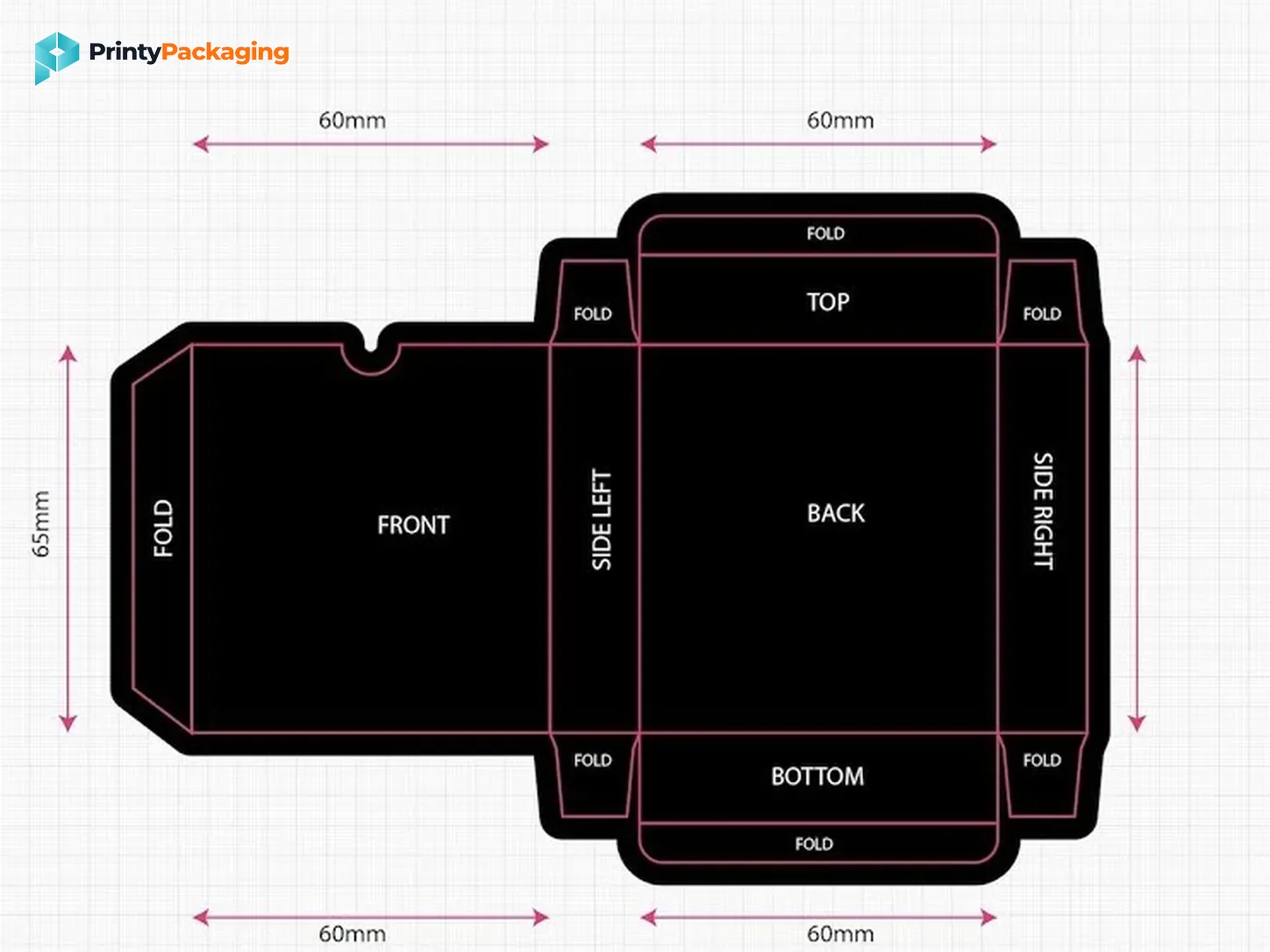
A dieline is the flat, unfolded template of your box. It shows the outline that will be cut, the lines that will be folded, and every panel: front, back, sides, lid and flaps.
Always design on the dieline from your supplier, not on a template from the internet. Board thickness changes the exact measurements, so a template made for a different board can put your logo across a fold or cut off the edge of your text.
Read the dieline: what each line means
Every supplier uses slightly different colours, but the meaning is always the same. Check the legend on your file.
| Line | Usually shown as | What happens there |
|---|---|---|
| Cut line | Solid line | The board is cut through |
| Fold or crease line | Dashed line | The board is folded |
| Bleed | Line outside the cut | Artwork must extend to here |
| Safe zone | Line inside the cut | Keep text and logos inside this |
| Glue area | Shaded panel | No ink here, glue is applied |
Already know your box? Free quote, we reply within 10-15 minutes.
Get Free QuoteThe print-ready checklist
Go through these before you send your file. Each one prevents a common reprint.
| Check | Why it matters |
|---|---|
| Artwork extends 3 mm (1/8 inch) into the bleed | Stops thin white lines at the edges after cutting |
| Text and logos sit 3-5 mm inside the safe zone | Nothing important gets cut off or lands on a fold |
| Colour mode is CMYK, brand colours given as Pantone | Screen RGB colours shift when printed |
| Images are at least 300 dpi at final size | Low resolution prints blurry |
| Fonts are outlined or embedded | Missing fonts get replaced with the wrong ones |
| Smallest text is 6 pt or larger | Tiny text blurs, especially on kraft |
| Barcodes are black on white, at 100% size | Scanners fail on coloured or shrunk barcodes |
| Dieline is on its own layer, not printed | Otherwise the template lines get printed |
| File is PDF, AI or EPS with vectors kept | Keeps logos and text sharp at any size |
Colours: CMYK, Pantone and why screens lie
Your screen mixes red, green and blue light (RGB). Printers mix cyan, magenta, yellow and black inks (CMYK). Some bright screen colours, especially neon greens, electric blues and vivid oranges, simply cannot be reproduced exactly in CMYK, so they print duller than you expect.
If a colour is central to your brand, give its Pantone number. The printer can then match it closely or use a special ink. And always judge colour on a printed proof or sample, not on your monitor.
On kraft board every colour prints darker, because the brown shows through. Test light colours before committing to a big run.
Plan every panel, not just the front
Customers turn boxes around. Use each panel with a purpose:
Front: logo, product name and the one line that says why it is good.
Sides: variant, size or scent, so the product is easy to find on a shelf.
Back: description, ingredients or materials, instructions, legal text and the barcode.
Inside or under the lid: a thank-you message, social handle or QR code. This is the part people film when they unbox.
Fold the printed dieline into a paper mock-up before approving. It is the fastest way to catch a logo that ends up upside down.
Mistakes that cause reprints
Text too close to a fold or edge.
Artwork that stops at the cut line with no bleed.
RGB colours or low-resolution images pulled from a website.
A barcode placed on a dark background or shrunk to fit.
Forgetting that the lid flap folds over, so its artwork appears the other way up.
None of these are hard to fix, but they are expensive once thousands of boxes are printed. A careful proof check is the cheapest insurance you can buy.
Proofs: your last chance to catch errors
Before production we send a digital proof: your artwork on the dieline, exactly as it will print. Check spelling, contact details, barcodes and the position of every element. Once you approve the proof, production starts, so take a few minutes over it.
If colour matters a lot, ask for a physical sample as well.
No designer? We can help
Send us your logo and brand colours with your quote request. We will send a free dieline, and for simple layouts our team can place your artwork and prepare the print file for you. We reply to quote requests usually within 10-15 minutes.
Products in this guide